September 2026 Release
Production Release Date: September 30
Rest APIs
The following API changes are documented on https://api.bunchball.com/docs.
-
GET /users/{userId}/award-marketplace-url/{type} - New API that returns the user's award account marketplace URLs and their browse-only status.
-
GET /challenges - Updated to move the timezone parameter from inside repeatableWindow to the root level.
-
The following APIs have been deprecated. They will be removed from the platform when web components reach their end of life.
-
/users/{userId}/award-catalog – Replace with /users/{userId}/award-marketplace-url/{type}.
-
/users/{userId}/award-country-code – Replace with /users/{userId}/award-access.
-
/users/{userId}/award-verification – Replace with /users/{userId}/award-access.
-
Product Updates
** Upcoming Webhook Mission Reversals **
In our November 2026 release, we'll be updating our mission completion webhook to include mission reversal events. A new completionStatus parameter will be added indicating if the mission event occurred because the mission was completed or removed. See Webhooks for an example of a mission completion events post call.
If your program uses mission completion webhooks, ensure you prepare for this change to ensure accurate data reporting.
Impact Marketplace Menu
Impact now displays a menu item for each Award Account Marketplace available within your program. When a user clicks the Redeem button, they can directly choose the marketplace they want to access.

Mission Timezone
You can now define a time zone at the mission level. All date and time settings within the mission, including Start Date, End Date, Featured Start Date, and Featured End Date, will use the selected time zone.
Dates and times set in existing missions will default to Pacific Standard Time (PST).
iconURL Reserved Preference
The iconUrl user preference has replaced the legacy userPhotoUrl preference for storing user images. Impact and web components remain backward compatible and will display an image that's set in iconUrl or userPhotoUrl. However, as images are added and updated, you should use the iconUrl preference.
Hidden Mission Filter
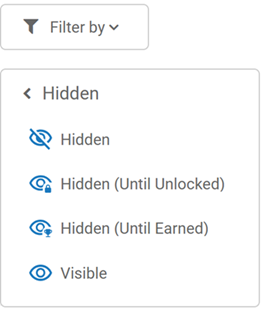
The Nitro Studio Missions list view filter has been updated to include all hidden mission types. You can now filter the missions list by always hidden, hidden until unlocked, hidden until earned, and not hidden missions.
Product Fixes
-
Fixed an issue in Impact where the expiring soon icon did not display on the mission tile.
-
Fixed an issue where a user that accessed a mission from an external source could see the mission details even though they were ineligible for the mission.
-
Fixed an issue where mission background images with invalid file names were uploading in Nitro Studio without error but did not display in the block. Now, invalid characters in a file name are replaced with spaces.
-
Fixed an issue where the featured calendar displayed behind the Add Label button in the mission builder.
-
Fixed an issue where the block builder was downloading an empty file instead of the default language file for an Impact and Recognitions block.
-
Fixed an issue in the Users view Actions tab where event IDs that included a space did not display.
-
Fixed an issue in data import where importing group actions with no event ID resulted in an error. Now, the event ID is automatically generated if one doesn't exist in the file.
-
Fixed an issue where tooltips were not showing correctly in the theme builder.
-
Fixed an issue where the height of the At a Glance section in Impact did not align with the featured section.
-
Fixed an issue in the Recognitions block where it incorrectly allowed users to enter a comment longer than 255 characters.
See also