October 2026 Release **Beta**
Production Release Date: October 28 - Planned
The following features, planned for the upcoming October release, are currently available in Sandbox for Beta testing. Our Production release could differ from the information detailed here.
Rest APIs
The following API changes are documented on https://api.sandbox.bunchball.com/docs.
-
PUT /challenges/{challengeId} - Updated to allow changes to 1 or more attributes (less than all) and only those attributes are updated. Previously, any attributes that were not updated in the PUT request would reset to their default values.
Product Updates
** Upcoming Webhook Mission Reversals **
In our November 2026 release, we'll be updating our mission completion webhook to include mission reversal events. A new completionStatus parameter will be added indicating if the mission event occurred because the mission was completed or removed. See Webhooks for an example of a mission completion events post call.
If your program uses mission completion webhooks, ensure you prepare for this change to ensure accurate data reporting.
Impact Award Account Browse and Unverified
When a program requires a user to be verified for the award account catalog, an unverified user will now see a Browse button instead of Redeem and an informational message indicating they are unverified. If no browse-only link is set for the catalog, only the unverified message displays.

Impact On The Spot Claim Button
The OTS Claim button in Impact now respects a user's verification status. If your program is set to verify a user for point rewards and the user is unverified, the Claim button will be hidden. If an unverified user cannot earn points from missions they also can't earn from an OTS card.
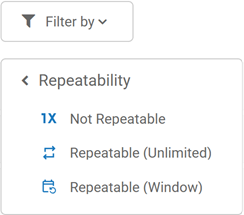
Repeatable Missions Filter
The Nitro Studio Missions list view filter has been updated to include all repeatable mission types. You can now filter the missions list by not repeatable, repeatable unlimited, and repeatable window missions.
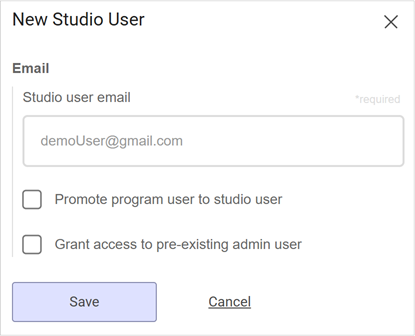
Studio User Password Fields
Password fields have been removed from the New Studio User setup. When adding a Studio user (admin user), you do not need to set their password. The user adds a password when they log in for the first time and sign up for an account.
Product Fixes
-
Fixed an issue where the block builder was not correctly setting the leaderboard return count when creating a new block.
See also